

Why do seller discounts multiply instead of add?
A 20% discount followed by 10% is 28%, not 30%. The reason is simple: each discount acts on a different base.
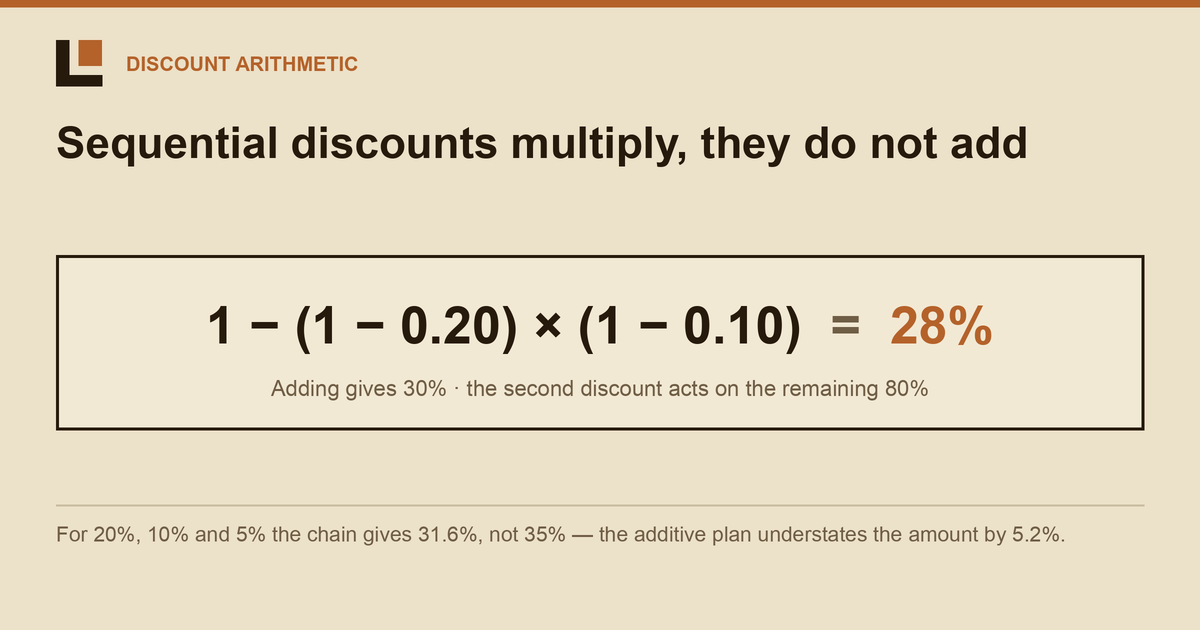
The first discount removes part of the original amount. The second applies to the remainder, not to the original base again. That is the whole mechanism—and the reason addition overstates the combined discount.
The second percentage has a smaller base
Start at 100%. After a 20% discount, 80% remains. The 10% discount then removes 10% of that 80%, which is 8% of the original. Total reduction: 20% + 8% = 28%.
The general rule is 1 minus the product of every remaining-rate factor. It handles any number of discounts without changing the logic.
A longer chain makes the error easier to see. For discounts of 20%, 10%, and 5%, addition gives 35%. Multiplication gives:
The additive plan therefore understates the required amount by 5.2%. By the time the discrepancy appears, the client may already have seen the earlier figure. The formula is easy to correct; the commercial expectation is not.
A discount is a multiplier inside the CPP chain
Combined discount does not sit harmlessly at the bottom of a worksheet. It changes the effective CPP, which then changes the budget, channel split, and TRP conversion.
CPP in this calculation is a planning proxy, not a real contracted price. Its purpose is to connect contact weight and volume consistently. It does not prove actual cost, savings, or ROI.
Because every downstream output remains internally consistent around the wrong multiplier, the error is quiet. A neat total does not validate the base.
The discount tier creates a second loop
The tier is set by the budget declared to the seller in the Shop List. Yet the budget required for the target TRP is already calculated using that tier's discount. Budget selects discount; discount changes budget.
That dependency cannot be solved honestly in one pass. The engine selects a tier, recalculates the budget, checks the new tier, and repeats until the pair stabilizes.
Sometimes adjacent tiers cause permanent oscillation: the higher budget activates a deeper discount, which pulls the budget below the threshold; the shallower discount then pushes it back above. A deterministic model needs a boundary rule. TV Budgeting takes the larger budget, a conservative buyer-side choice that reserves enough rather than explaining a shortfall later.
The important feature is not clever arithmetic. It is repeatability: two buyers using the same inputs should reach the same result, including at the boundary.
A one-minute check
Enter 20% and 10% in the model used for live campaigns. If the combined cell returns 0.28, the discounts are sequential. If it returns 0.30, they are being added. Then inspect whether the resulting budget is fed back into the discount tier; correct multiplication without tier iteration still leaves half the mechanism unresolved.
FAQ
Why do seller discounts multiply?
Because every discount applies to the amount left after earlier discounts. The bases are different, so the remaining-rate factors multiply.
What do 20% and 10% discounts equal together?
They combine to 28%: 1 − (0.80 × 0.90). Adding them to 30% applies the second discount to the original base by mistake.
How do three discounts combine?
Multiply all remaining-rate factors and subtract from one. For 20%, 10%, and 5%, 1 − (0.80 × 0.90 × 0.95) = 31.6%.
This is exactly the maths TV Budgeting runs for you — both directions, TRP → budget and budget → TRP, with discount tiers resolved by iteration.
Request a demo →