

Calculation guide
TV planning: from target rating to budget — and back again
Two conversions run in opposite directions on the same number. Almost every error in a media plan is an error inside that number.
TV planning turns a rating target into money, then money back into a rating. Forward: you know the delivery you need and want its cost. Backward: you have a budget and want the points it buys. Both conversions ride on CPP — the cost per rating point on your target audience. That one number is where plans quietly go wrong.
Forward looks trivial. Budget = wTRP × CPP. Need 1,200 weighted target rating points at a CPP of 100 and you get 120,000. The arithmetic is right. It is also almost never enough, because the CPP you should be multiplying by is not the CPP on the rate card.
What is the CPP chain in TV planning?
CPP is not an input. In media planning software built for this job it is a chain of four terms, applied in a fixed order:
Each term carries its own trap.
| Term | What it does | Where it misleads |
|---|---|---|
| base_cpp30 | Price of one point on a 30-second spot | Inventory must be duration-weighted before it is priced |
| seasonality | Period multiplier on the base price | Often left in someone's head instead of the model |
| combined_discount | Stacked sales-house discounts | They multiply; adding them overstates the saving |
| prime_uplift | Premium negotiated on the deal | Applies to the whole deal, not the prime portion |
base_cpp30 prices a 30-second spot. Other lengths carry their own coefficients: 30s sits at 1.0, shorter copy below it. A 15-second spot neither costs half nor delivers half, so the plan has to weight inventory before it prices it.
Seasonality is a price coefficient with a number attached. Put +15% on a high-demand month and every figure downstream moves with it. Keep it in the model where someone can check it.
Do sales house discounts add or multiply?
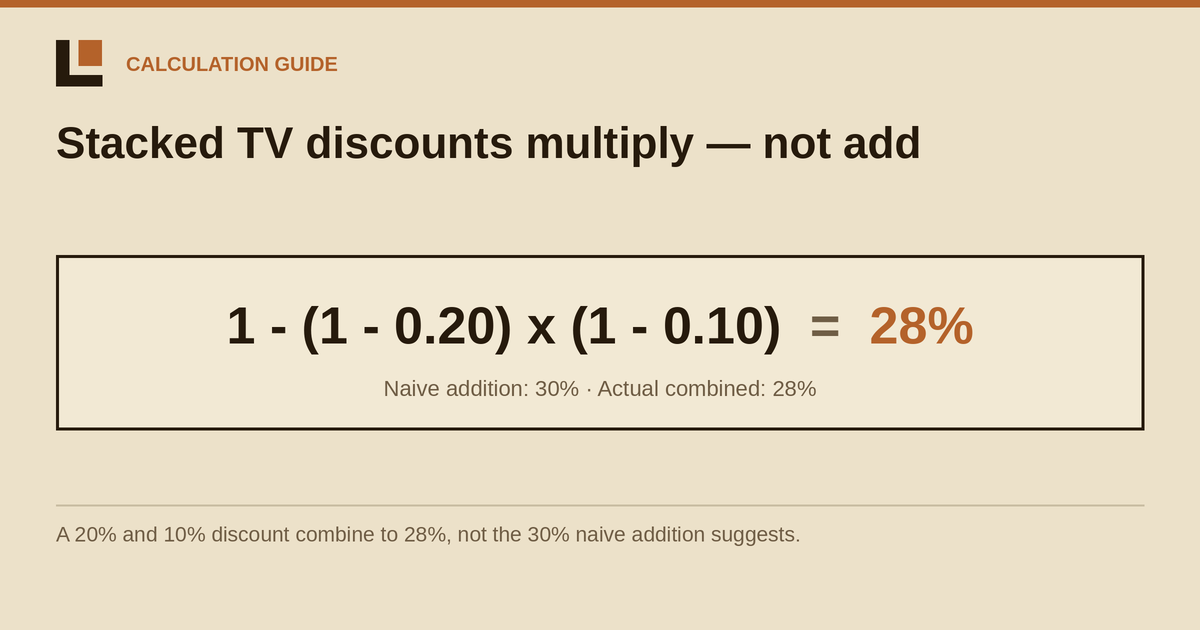
They multiply. This is where most hand-built plans break:
A 20% volume discount and a 10% commitment discount give 28%, not 30%. On a 100,000 shop list that is a 2,000 gap: small enough to survive a review, big enough to lose a tender when three agencies sit within a percent of each other. Add a third discount of 5% and the additive shortcut claims 35%; the correct answer is 31.6%. Every extra line widens the gap.
prime_uplift is the field most people misread. It applies to the entire deal, not only the prime-time portion. Enter 10% expecting it to touch a third of your points and it reprices all of them. That matches how the uplift is negotiated, so the behaviour stays. It does mean the field needs a clear label, because a planner who assumes prime-only will overstate the deal cost badly.
How do target points relate to total points?
The rating you buy and the rating the channel sells are different currencies. Affinity is the bridge:
Affinity 200 means your target watches twice as densely as the general population, so 600 target points come from 300 total points. Affinity 80 runs the other way — the target is under-represented, and the same target delivery eats more total inventory.
This bites hardest in the prime/off-prime split. Off-prime is defined as a share of money, then converted into a share of ratings using affinity and the off-prime discount. "40% of my spots" and "40% of my money" describe two different plans, and only one of them survives contact with the invoice.
Why does budget-to-rating need iteration?
Because you cannot just divide the budget by CPP. CPP depends on the discount tier; the tier depends on the budget you declare. Each defines the other.
So it loops: candidate budget, resolve the tier, recompute the effective CPP, recompute the achievable volume, recompute the budget that volume implies, repeat until it settles. Usually a few passes. Sometimes it oscillates between two adjacent tiers — the budget sits just above a threshold, unlocks a deeper discount, drops just below the threshold, loses it again. When that happens we take the larger budget. It is the conservative side for the buyer: better a plan that comes in slightly cheap than one that comes in short.
Two money layers are tracked separately throughout:
- Shop List — the budget declared to the sales house. This is what sets the discount tier.
- Execution — what is actually spent.
They are not the same number and do not need to be. Collapse them into one field and the plan quietly loses the tier it was priced on.
How should points be distributed across weeks?
Once volume and money agree, the plan has to land on a calendar. Typing 52 weeks of numbers by hand is data entry, not planning.
Our engine ships 17 flight templates — Flat, Front-Loaded, Mid-Peak, Crescendo and others — with 5 intensity levels from 0.5 to 1.7. Shape is not decoration. It follows research on how television pressure decays and accumulates: Broadbent's adstock work puts the FMCG half-life around 2.5 weeks, which is why a front-loaded burst behaves differently from a flat drip at identical total points. Jones's STAS work on short-term advertising strength and the Binet & Field long/short framework point the same way. Distribution is a lever.
One consequence worth stating plainly: active months are derived from delivered TRP, not from what the planner typed into a month field. A month with zero delivered points is not an active month, whatever the header says.
Why the arithmetic has to live in one place
Every error above is small on its own. 28% instead of 30%. A 15-second coefficient. An uplift read as prime-only. Off-prime read as airtime. Alone they are rounding. Stacked across 18 brands and a quarter of flights, they separate a plan that reconciles from a plan that gets argued about for three days.
That is the design goal behind TV Budgeting's calculation core: one frozen engine, both directions, no drift between them. Parity with an agency's reference Excel model is under 0.01%, held by roughly 750 backend and 2,100 frontend tests — close to 3,000 checks whose only job is to keep the engine answering today the way it answered last quarter. Where our audience numbers touch Nielsen data, we reproduce Nielsen's figures; we do not reinterpret them.
The engine also refuses to guess. Miss a required input and it fails with the name of the field instead of substituting a default. What you see is what was computed. A silent default is a number nobody chose sitting inside a number somebody signs.
One honest caveat, and it changes how you read everything above: CPP here is a proxy. Our data holds no real price lists, so nothing on this page claims what your campaign will cost, save or earn. It describes how the conversion works. The prices are yours.
FAQ
What does TV planning actually compute?
Two conversions on one CPP: forward from a weighted target rating to a budget, and backward from a budget to the rating it buys. Everything else — duration weighting, affinity, discounts, uplift, flight shape — feeds those two.
Do sales house discounts add up or multiply?
They multiply: combined = 1 − Π(1 − rᵢ). Discounts of 20% and 10% give 28%, not 30%. Add a third at 5% and the answer is 31.6%, not 35%.
Why does the budget-to-rating calculation need iteration?
The discount tier depends on the declared budget and the achievable budget depends on the discount, so the model converges by iteration. If it oscillates between two adjacent tiers, we take the larger budget — the conservative side for the buyer.
Is off-prime a share of spots or a share of budget?
A share of budget. It is set in money, then converted into a share of ratings using affinity and the off-prime discount. Setting it as a share of airtime describes a different plan.
Does the prime-time uplift only affect prime inventory?
No. The uplift applies to the entire deal. Entering it as if it touched only the prime portion overstates cost across all points.
Both conversions against your own CPP assumptions — forward from a target rating, backward from a budget, with your discount ladder and your flight shapes. That is what TV Budgeting does. We are happy to walk one of your existing plans through it.
Request a demo →